# Release Notes v2.5.0
## 1. Introduction
This release introduces new features and improvements to the product. The updates include:
## 1.1. New Features
## 1.1.1 Traffic 360
1\. **Record count is shown on the traffic analytics page**
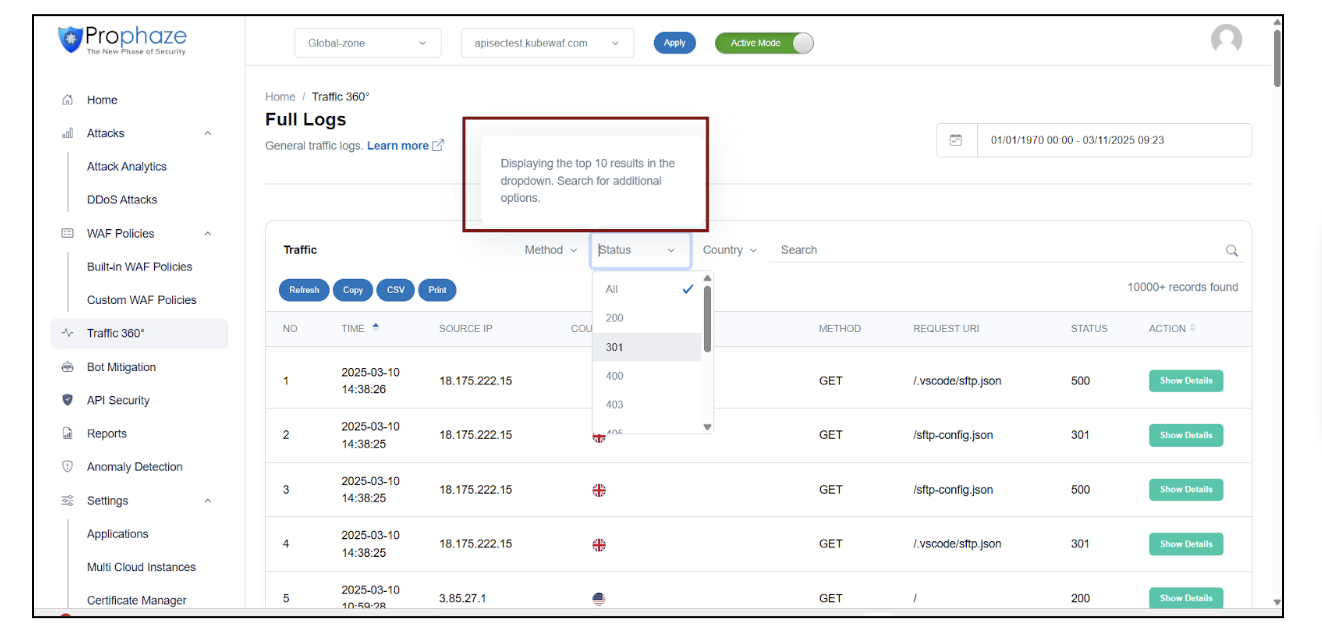
The total number of requests for the applied filters is displayed in the highlighted area at the top of the page. Additionally, even when no filters are applied, the total count of records based solely on the date-time picker is shown.
2\. **Column Width Standardization:** Adjusted the width of the Referrer and Request URI columns to ensure consistency and a uniform layout across the table.
3\. **Request URI Display Enhancement:**
* Modified the Request URI column to display only a truncated version of the URI within the table.
* Included a tooltip that reveals the full URI when hovered over, providing access to the complete information without affecting the table layout.
4\. **Tooltip for Filter Dropdowns**: Added a tooltip to the filter dropdowns with the message: "Displaying the top 10 results in the dropdown. Use search to find more options." This guides users on the dropdown functionality and encourages them to search for additional choices if needed.
## 1.1.2 Login & Sign Up
Implemented client-side validation and error handling for the Sign-Up page in line with the updated design.
## 1.1.3 2FA
Added an option to disable two-factor authentication.
\
\
\\